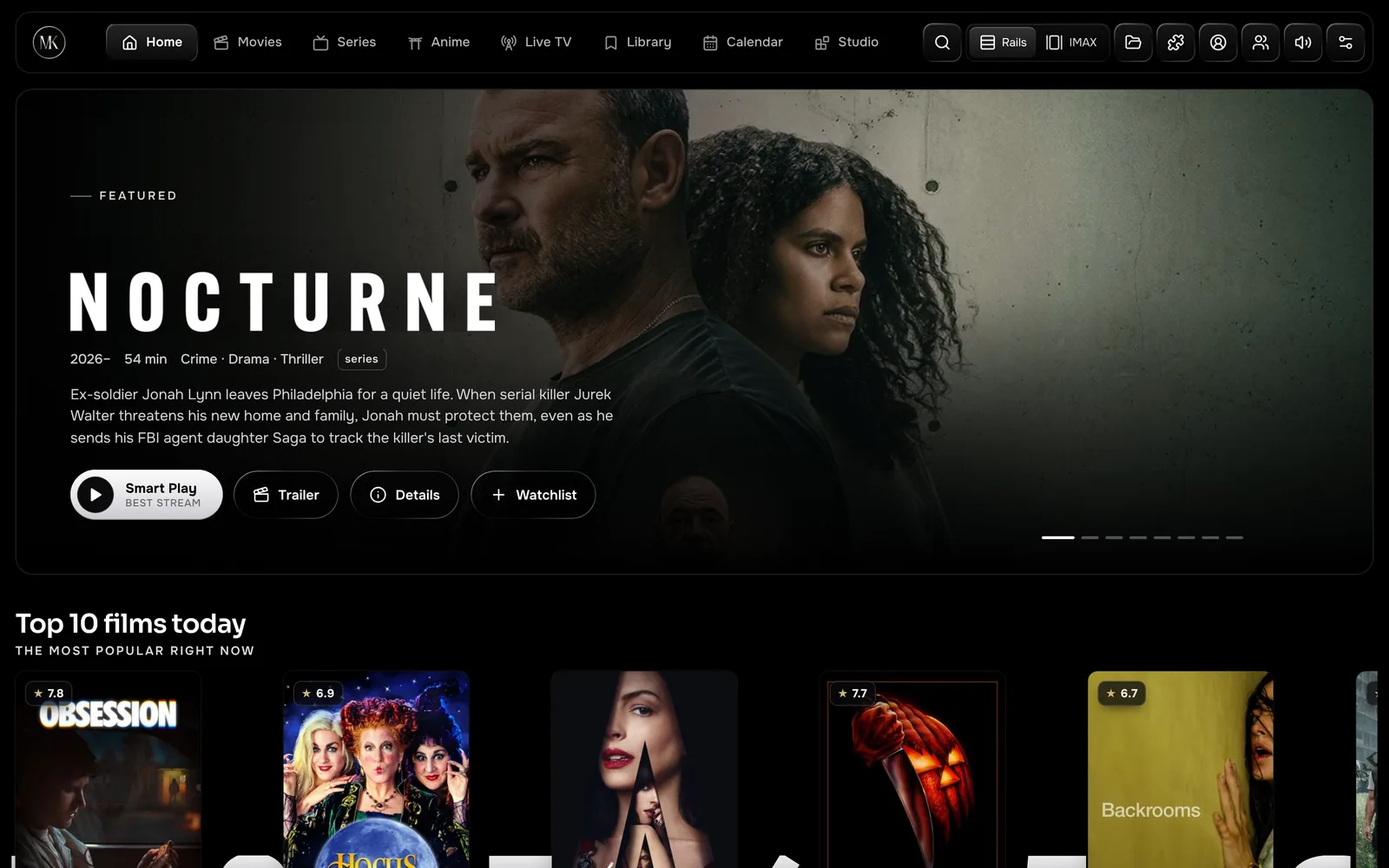
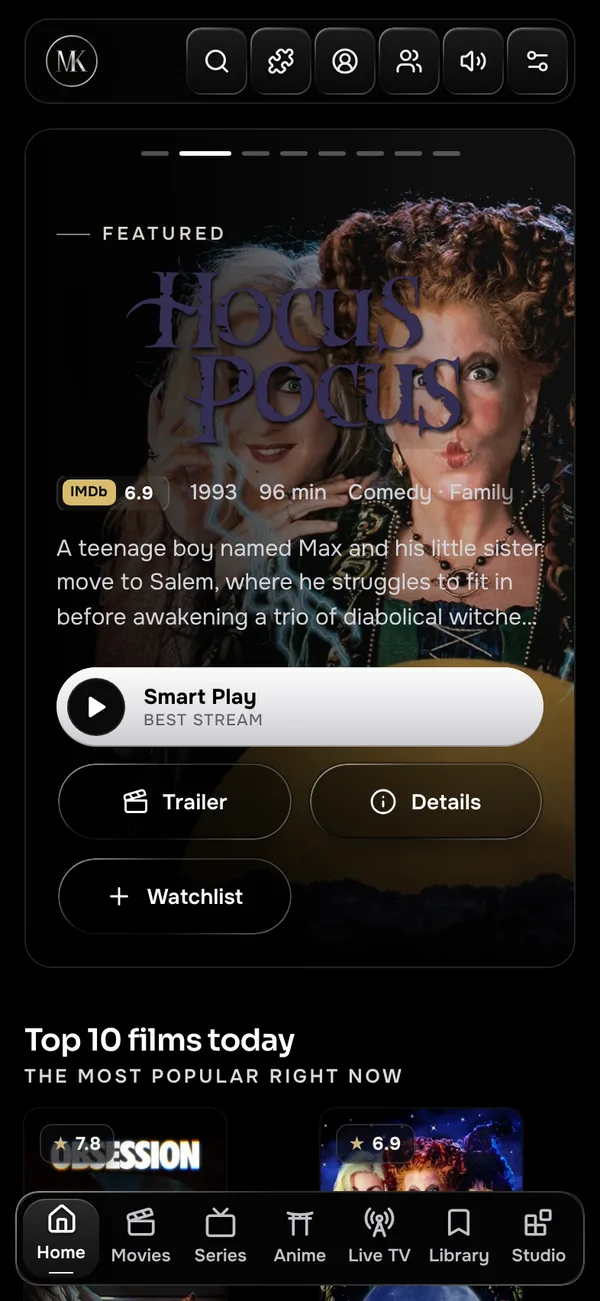
Your addons, your rules
Install any Stremio addon by link, reorder them, and see results from each one the moment it answers. MKCinema ships no catalogue of its own, so what you watch is always your choice.
Stremio addon compatible
MKCinema plays the Stremio addons you choose in a cinema that looks the way you like it: five looks, a colour wheel and an Anime mode. Debrid built in, a player that can send the sound to your phone, watch parties and picks that never leave your device.
Works with the services you already use
 SimklIMDb ratingsOfficial trailersWikipedia for X-Ray
Every feature here ships in MKCinema today, in the apps and in the browser. No upgrade tier, no ads, no account needed to try it.
Install any Stremio addon by link, reorder them, and see results from each one the moment it answers. MKCinema ships no catalogue of its own, so what you watch is always your choice.
Bring your own key from whichever debrid service you already use. Cached results are marked ⚡ and play straight in the browser.
Hand any stream to VLC, Infuse, MX Player, mpv, IINA or PotPlayer. MKCinema only lists players your device supports.
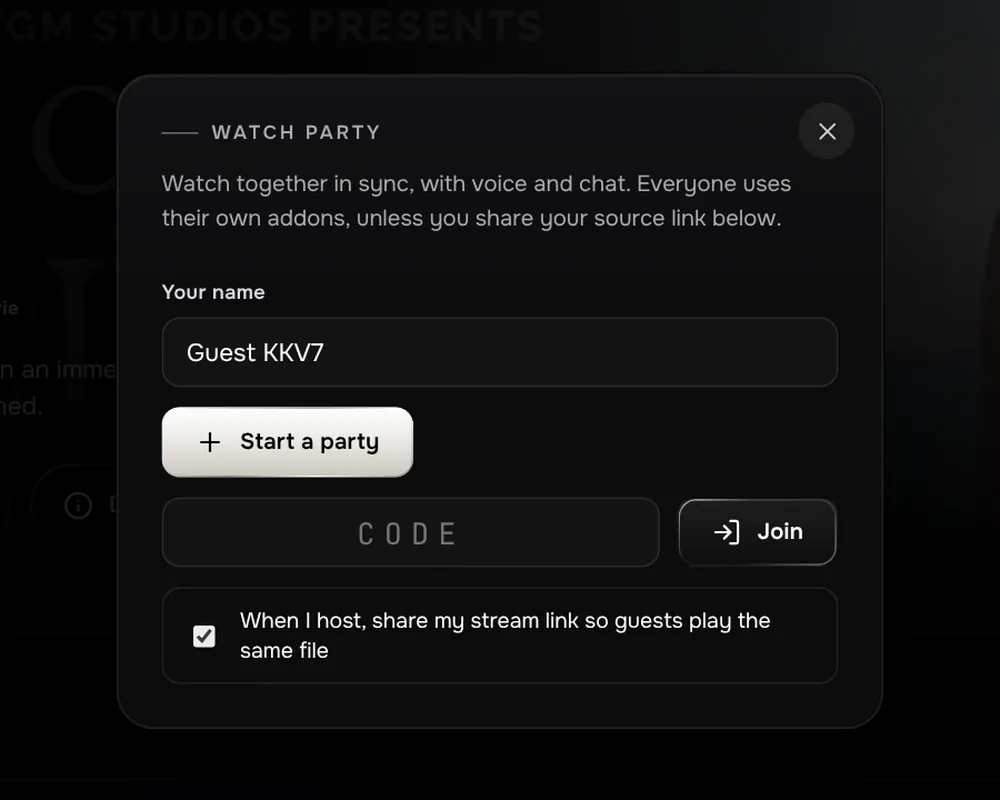
Share a six-letter room. Play, pause and seeks stay in sync, with chat, reactions and push-to-talk.
Pause for a second to see the cast, actor bios, release facts and the picture and sound details.
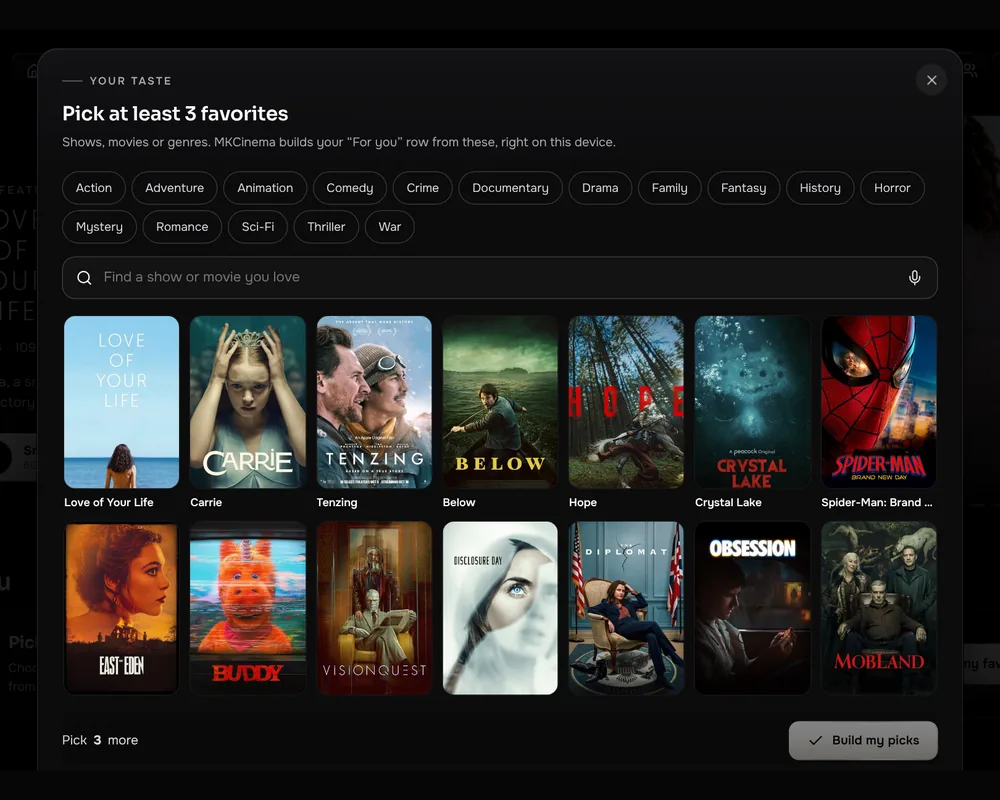
A For you row built from your favourites and history. Ask in plain words, like "funny crime series". It all runs on your device.
Sign in with email to carry your library, progress, addons and settings to every device you use. Changes from all your devices merge, so nothing gets overwritten. Scrobble to Trakt or Simkl too.
SimklCan't install a player? MKCinema lists only the sources your browser can play with picture and sound.
Can't decide? Surf 90-second scenes from films in your catalogs and watchlist, by mood. Keep watching opens the film at that exact second.
Noir, Midnight, Velvet, Sepia and Anime, plus a colour wheel that tints the whole app. Your choice follows your account to every screen.
A screensaver that turns your Home into layered, slowly moving film art. OK opens the film, Back returns you exactly where you were.
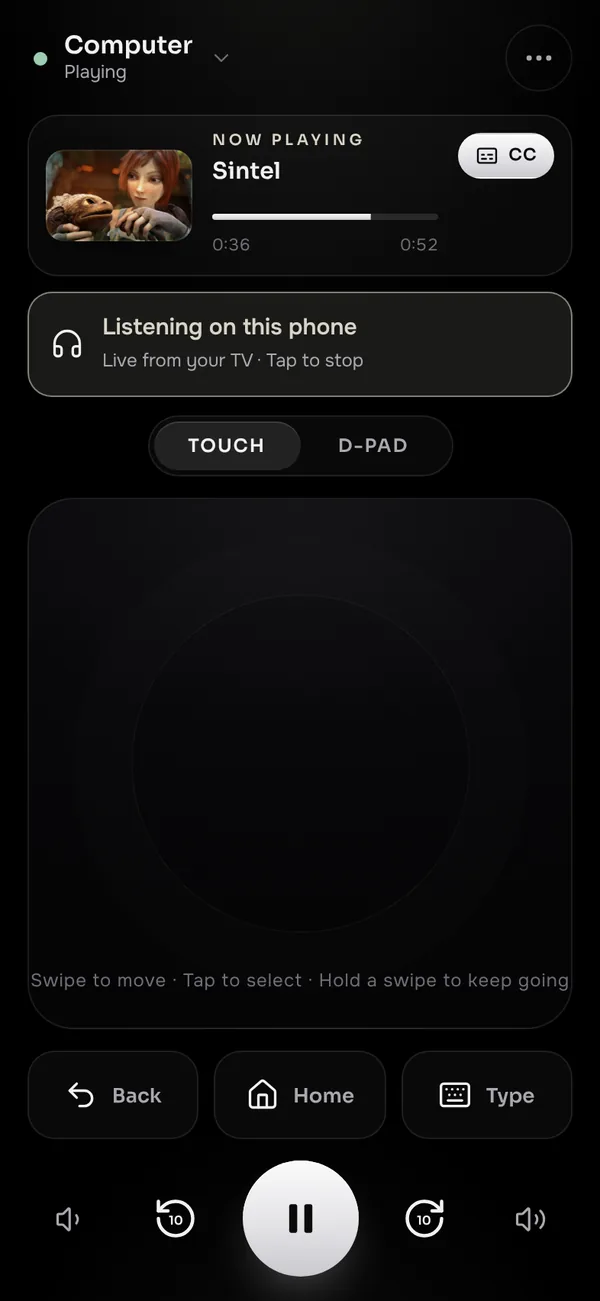
The film plays on the TV and the sound comes out of your phone, so you can watch with headphones while the house sleeps. No app to install: it's the phone remote you already scan.
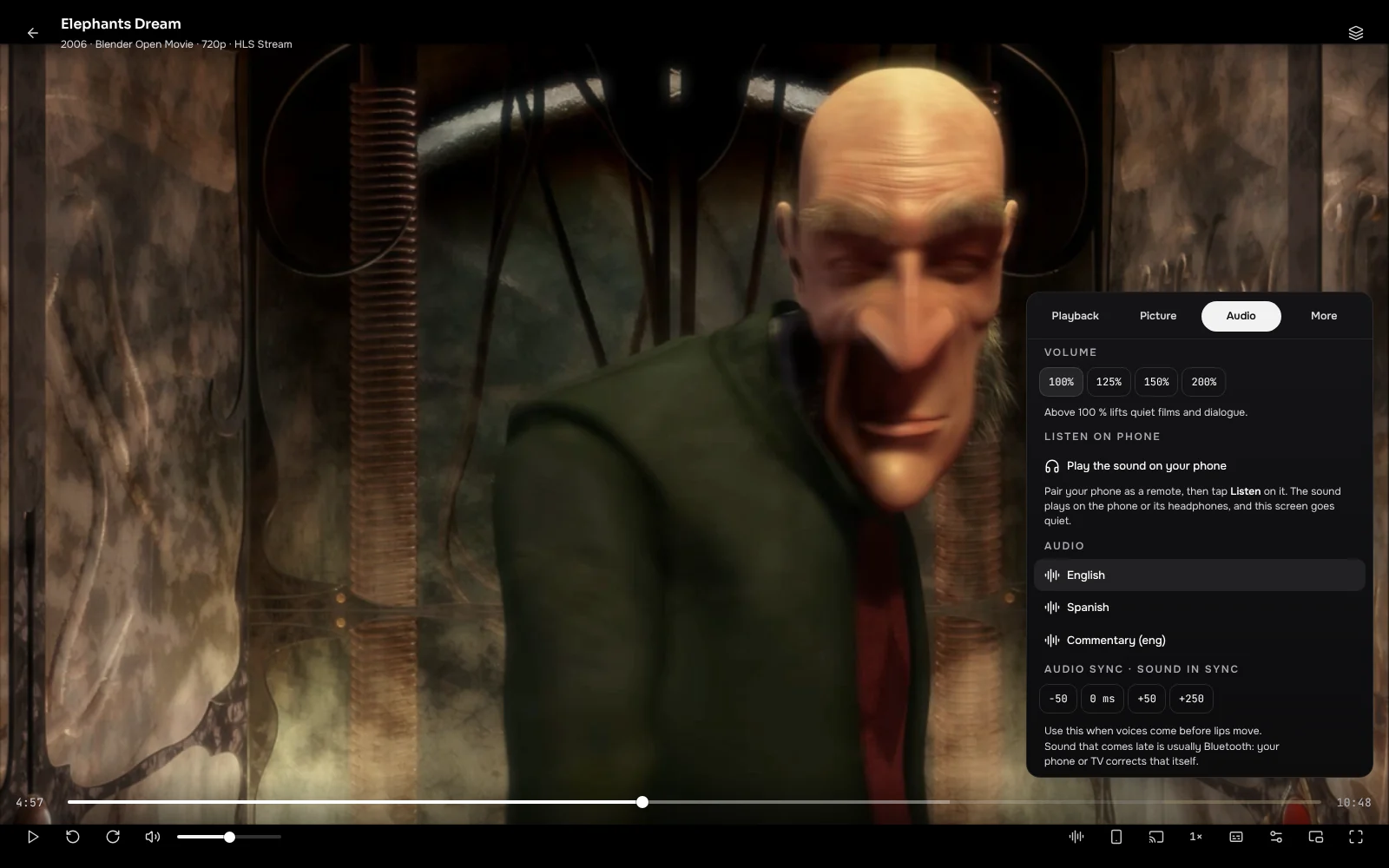
New in 2.20Quiet film, small speakers? The slider goes past 100 % and turns champagne so you know you're boosting. Dialogue comes through without reaching for the remote.
New in 2.20Menus in English, Español, Português, Français, Deutsch, Italiano and हिन्दी. It follows your device, or pick one in Settings.
Add any MDBList list as a row on Home with your own free API key. Curated lists, award shortlists, whatever you follow.
One quiet notice when a series you follow gets a new episode, checked on your own device. No server reads your list.
Skip intros, endings and credits, anime included from any addon, and get a 10-second countdown to the next episode while its sources warm up. If a source stalls, MKCinema moves to the next one by itself.
Scan the code on your TV and your phone becomes a touchpad or D-pad with play, seek, volume and subtitles. Type searches on the phone's keyboard, by voice where it's supported. Your TV asks before a new phone can take control.
Your Discord profile shows "Watching" and the title while a film plays, with the poster and time left. Switch it on in the Windows app under Settings › Desktop app.
Add community features and looks from a reviewed, signed gallery. Every file is checked before it runs, and you can switch any of them off in a tap.
Paste a poster link from a service such as Pictorium and every card gets its art, with ratings and logos built in and landscape posters on wide cards. Thanks to Pictorium's creator, Eful97, for suggesting it.
New in 2.31Edge-to-edge picture, times beside the bar, and every option one tab away: Playback, Picture, Audio and More.
Late film, sleeping house? Tap Listen on the phone remote and the TV's sound moves to your phone, live and in stereo. The TV goes quiet, and the lock screen controls the film.
Its own Anime tab with what's trending and airing now, and an Anime look in crimson and violet with sakura petals and Miko, our mascot. Playing still uses your own addons, like everything else.

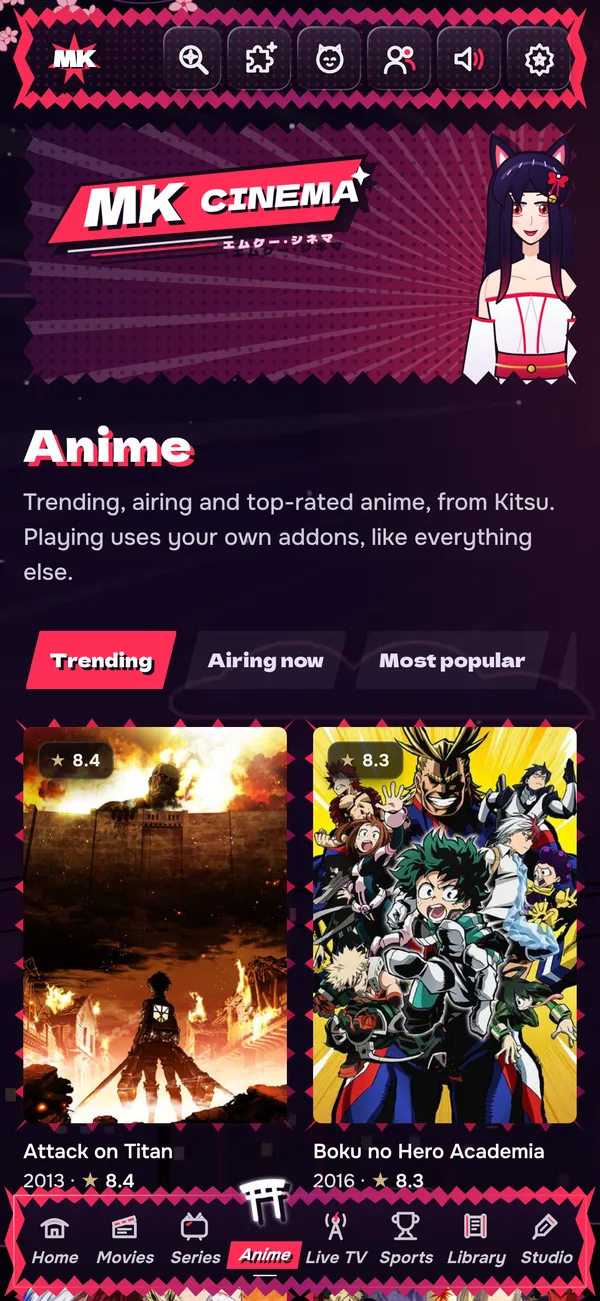
Fansub fonts, signs, positions and karaoke render the way they were made, right in the browser.
A Skip button for openings and endings, whichever addon the episode comes from.
Your progress is marked when you finish an episode, and your lists come in on import.
Four rows from Kitsu: Trending, Airing now, Most popular and Top rated.
Every look stays dark so the poster art leads, and each keeps the same readable contrast on phones and TVs. Switch in Settings › Appearance and it follows your account.
Start a party, share the code, and everyone watches the same title from their own sources. Drift is corrected quietly, so nobody hears the punchline first.
Your Picks learns what you like inside your browser. No outside AI service ever sees your watch history.
Side by side with Nuvio, Stremio, Plex, Jellyfin and Kodi. Everything in the MKCinema column is built in and free. Nuvio is the closest match, checked against its own source code.
| Feature | MKCinema | Nuvio | Stremio | Plex | Jellyfin | Kodi |
|---|---|---|---|---|---|---|
| Stremio addons and your own Plex, Jellyfin or Emby server in one libraryOne home for everything you watch | ◐ | |||||
| Watch party with synced playback, chat and voiceShare a six-letter room | ◐ | ◐ | ◐ | |||
| Skip intro, ending and creditsAnime included, whichever addon it comes from | ◐ | ◐ | ◐ | |||
| Moves to another source by itself if one stallsNo picture or a stall, and the next source takes over | – | – | ||||
| Subtitle sync you drag into placeWith a live transcript to line it up | ◐ | ◐ | ◐ | ◐ | ◐ | |
| Seats for the householdPINs, kids seats by age rating, seat pictures | ◐ | ◐ | ||||
| Your phone as a remote, no app neededScan the code on the TV | ◐ | ◐ | ◐ | |||
| Your own M3U or Xtream channels with a guideXMLTV listings built in | ||||||
| Split Screen, up to four streams at onceChannels, matches, anything, side by side | ||||||
| Hear the TV on your phone, in your headphonesLive sound to the phone remote, no app to install | ||||||
| Ask for picks in plain wordsWorked out on your device, never sent anywhere | ||||||
| Plugins and themes from a reviewed galleryEach file checked before it runs | ◐ | |||||
| Import your Stremio library, progress and addonsOne step, password never stored | – | |||||
| Runs in a browser, nothing to install or hostPlus apps for Android, TVs, Windows, Mac and Linux | ◐ | |||||
| Free and open sourceEvery line on GitHub, GPL-3.0 | ◐ |
built in · ◐ partly, or only on some devices · not built in · – doesn't apply
Every row has a source in our README on GitHub. Checked November 2026.
Settings › Account › Import from Stremio copies your library, watch progress and addons, keys included. MKCinema signs in once, reads the data and signs that session out. Your password is never stored.
Seats for the whole house, kids seats by age rating, hiding and moving any Home row, downloads, subtitles that sync themselves and four looks are all free here. No plans, no ads.
Visit app.mkcinema.app and pick a few favourites. Sign in with email if you want sync.
Install the Stremio addons you use from the puzzle icon, or import them from Stremio. Official trailers work out of the box.
Optional. Settings › Get started walks you through adding the debrid service you use and a player like VLC.
Free apps for Android, Android TV, Fire TV, Windows, Mac and Linux, or the full app in any modern browser. Sign in once and your library follows you everywhere.
The full app for phones, tablets and Android TVs, with a full-screen player and one-tap hand-off to VLC.
Download APK Version 1.6.2 · 12 MB · Android 7 or laterMKCinema in its own window, with your library, addons and sign-in kept between sessions.
Download .exe Version 1.3.0 · 14 MB · Windows 10 or 11, 64-bitA native window built on the WebKit in macOS, with the menu bar, full screen and keyboard shortcuts you expect.
Download for Mac Version 1.1.1 · 12 MB · macOS 11 or later, Intel and Apple siliconA lightweight WebKitGTK app with a launcher entry and icon. Ubuntu, Debian, Mint, Fedora and more.
Version 1.1 · x86-64 · needs WebKitGTK 4.1 (2.40 or newer)The cinema on the big screen. Browse with your remote's arrows and OK, Back closes what's open, and play, pause and skip work from the remote's media keys.
MKCinema isn't on Google Play yet, so Android warns about apps installed from outside the store. Only download the APK from this page.
tv.mkcinema.app and tap Install.tv.mkcinema.app. You can also copy MKCinema-TV.apk over with a USB stick and open it with a file manager.itbelikethatbruh/mkcinema@main/tizen.On any TV, VLC works best for playing streams.
MKCinema uses Microsoft Edge WebView2, which comes with Windows 10 and 11. If it's missing, MKCinema offers Microsoft's download page.
This happens because the Mac app isn't notarized by Apple yet. You only need to do it once.
sudo apt install ./mkcinema_1.1_amd64.deb, or open it with your software centre.sudo dnf install webkit2gtk4.1 or sudo pacman -S webkit2gtk-4.1), unpack the .tar.gz and run ./install.sh.Rather not install anything? Open MKCinema in your browser
MKCinema is open source under the GPL-3.0 license. Read exactly how your keys and data are handled, build the apps yourself, report a bug or send an improvement.
Open MKCinema now. It takes seconds, and your seat is already waiting.
MKCinema will never charge for anything. There is no paid plan, no premium tier and no feature behind a paywall, and there never will be. What you get today stays free, and everything we add later is free too.
Donations on Ko-fi are optional and never unlock anything. The code is open under GPL-3.0, so nobody can ever take the free version away.
MKCinema is made by Drake Christopher, with no ads and no paid tier, and it stays free forever. Donations are optional and never unlock anything. If it's become your favourite way to watch, a coffee on Ko-fi of any size keeps it growing.